

Showing a video at a funeral: your own clips in the slideshow
A clip from someone's phone between the photos, or a few videos in a row as a moment of their own. You decide where it goes, how long it runs and what people hear.
Start for freePay only when you download, with iDEAL | Wero or card
Upload together
Family add their own photos
Create together
You select the most meaningful photos
Watch together
View the presentation with family
A voice, a laugh, a wave
A video at a funeral is usually a short clip: twenty seconds from a birthday, a few lines of a wedding speech, someone waving from the garden gate. With The Last Farewell you place that clip in the funeral slideshow at the point in the order of service where it belongs. This page explains where a video can sit, what happens to its sound, how time is shared between the video and the photos, and what the venue needs in order to play it.
Easy to use
Create together with family
Professional result
Ready within an hour
Where the clip goes and how much time it takes
There are two places for a video. One is between the photos of a part, for example halfway through the funeral photo slideshow set to music. The other is a part of its own, called a video compilation: one or more videos played in a row, with no photos in between. That suits a clip everyone should be able to watch and listen to without distraction, as you might in a celebration of life slideshow.
A video takes up fixed time: exactly as long as the clip lasts. The photos in the same part share what is left of the song. An example: the song runs 3 minutes 30 seconds (210 seconds) and the video 40 seconds. That leaves 170 seconds. With 24 photos, each photo is on screen for about 7 seconds. Aim for at least 6 seconds per photo; each part shows how many seconds the videos take and what remains for the photos.
If too little time is left, you have three options. Shorten the video to the stretch that matters: you pick a start and an end point, and the original stays in your collection. Choose a longer song. Or take a few photos out of that part. If the video is longer than the music, you get a notice, so it does not come as a surprise during the service.
What people hear while the video plays
Video between the photos
The music of that part keeps playing and the video starts out silent. If you want the voice or the laughter to be heard, switch the sound of that video on.
Video compilation
Each video plays from start to finish. For every video you choose whether its sound is on or off, so a clip full of wind noise or chatter can stay quiet.
Background music underneath
You can run your own MP3 under a video compilation. A slider sets the volume; it starts low (15 percent) so that speech stays clear.
Waiting before a video
In a video compilation you can put a stop on a video. The slideshow then waits until the operator clicks on. Useful when someone wants to introduce the clip first.
Which clips work on a large screen
- Short: 15 to 45 seconds per clip is plenty in a room full of people. Trim a longer recording down to its best part.
- Landscape footage fills the screen. A clip filmed upright works too, but shows wide bars left and right.
- Steady footage: a calmly filmed clip is easier to watch than one that swings in every direction.
- Clear speech: play the clip on a laptop without earphones. If you cannot make out the voice, turn the sound off and let the music carry it.
- One or two videos per part is usually enough. More clips do better together in a video compilation.
Clips from phones, including the family's
You add a video from your phone, tablet or laptop, in the browser, with nothing to install. MP4 and MOV files work, up to 500 MB per video. A recording the browser cannot play straight away, as with some iPhone videos, is converted first; that can take a few minutes, after which the video appears in the collection.
The best clips are often on someone else's phone. You invite family and friends by email as helpers. A helper gets access with their email address and a code and adds videos, photos and music to the collection themselves. Nobody has to forward clips through a messaging app, which is better for quality: those apps tend to shrink videos.
Everything lands in one collection, alongside the photos: HEIC from an iPhone, JPEG and PNG all work as they are. You then choose which video goes into which part.
Video and music in the same part
The music for a part is an MP3 file of your own. The photos spread themselves across the length of the song, around the video. A video is shown once; only the photos move up to make room.
Does a song exist only as a video, such as a recording of someone singing or playing the piano? You can take the sound from that video and use it as a piece of music. The photos then run to that recording.
Important: Spotify and YouTube are there only for finding and listening to music while you are making the slideshow. The download contains your own MP3 and the sound of your videos, never music from Spotify or YouTube.
What the venue needs to be able to play
The videos are inside the file you download, so no internet is needed during the service. Ask the funeral home or venue which format they use and have them run the file once beforehand, with sound. With video this matters more than with photos alone, because the sound has to come through the room's own system.
PowerPoint (.pptx)
The video sits on its own slide and starts by itself; afterwards the slideshow carries on. Music, waiting points and notes for the operator are in the same file.
Numbered photos
For venues with their own playback system. The photos are numbered (001.jpg, 002.jpg); a video comes along as a separate file at its place in the sequence, and the music separately.
Farewell Player
A free player for Windows 10/11 and macOS 10.14 or later. It plays photos, videos and music without internet and without PowerPoint; you control it with the space bar and arrow keys.
Video (MP4)
One video file per part, with the photos, your own clips and the music combined. Plays on almost any device.
Watch and listen first, then decide
Whether a video at a funeral feels right only becomes clear once you see it in place. The preview plays the memorial slideshow as it will run at the service, with music, videos and waiting points. You hear at once whether a voice carries over the music and whether the step from photo to video is calm.
Making, previewing and changing is free, as often as you like; the free preview carries a light watermark. You pay once, when you download, with no subscription. You can download again later, for instance when one more clip turns up the evening before.
If you prefer, the assistant in the simple view will put a video into a part when you ask in plain words. Everything can also be done without the assistant.
Free to make and preview, with videos and music. A one-time … when you download.
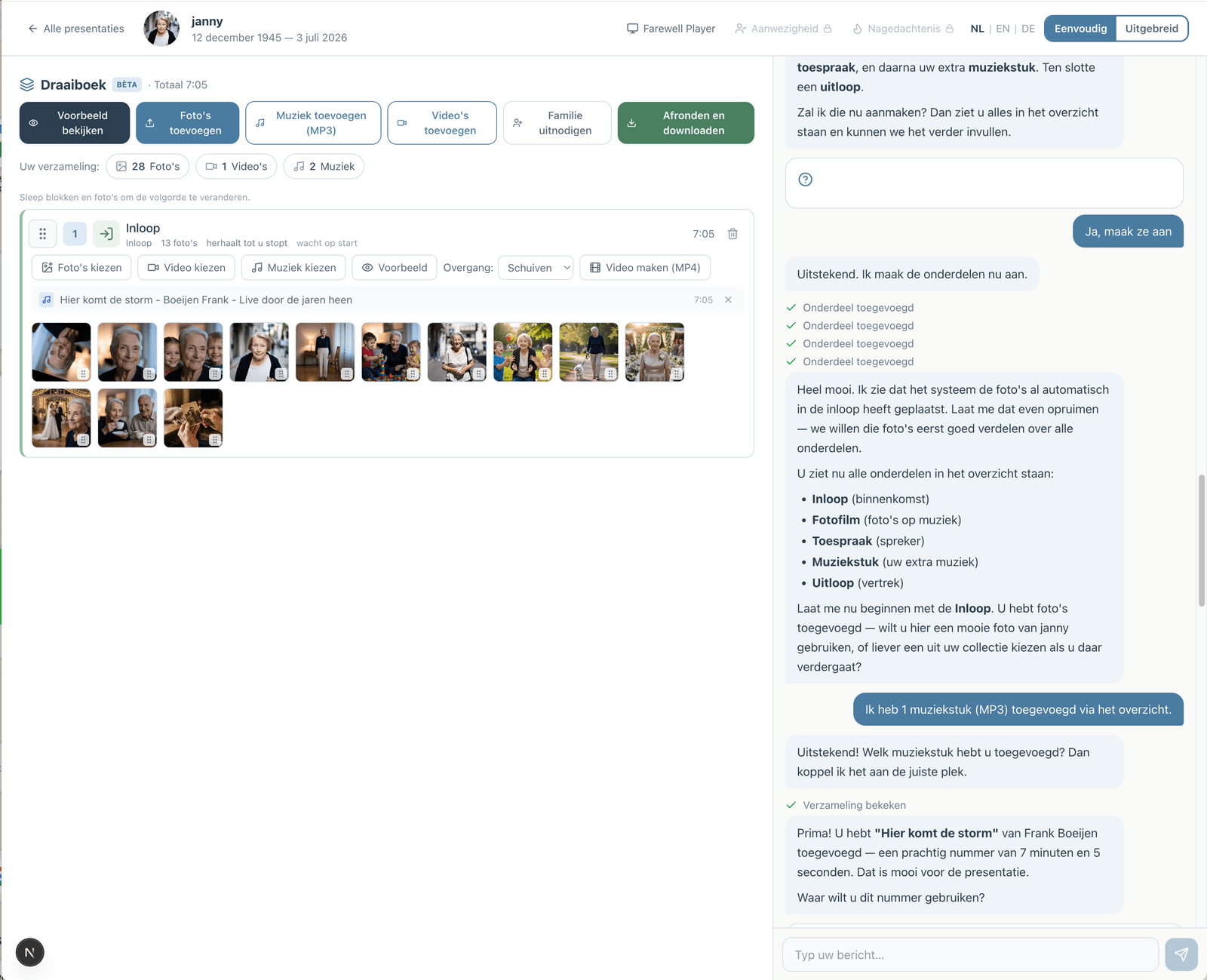
Prefer to go step by step? The assistant can help
If you would rather not figure everything out yourself, you can work with an assistant in the simple view. You describe how the service will go; the assistant prepares the parts, the music and the photos. You make the choices, and you can switch to the advanced view at any time.
How the assistant worksHow does it work?
Create a free account
Upload photos and videos
Choose music and customize
Download or share the presentation