

How to make a celebration of life slideshow, step by step
A four-sitting plan: what to do first, how long each part takes, and what to ask the venue
Start for freePay only when you download, with iDEAL | Wero or card
Upload together
Family add their own photos
Create together
You select the most meaningful photos
Watch together
View the presentation with family
Four short sittings instead of one long night
A celebration of life slideshow comes together more easily in four short sittings than in one long evening, whether the gathering is this weekend or a month away. Each sitting takes between twenty minutes and two hours. The plan below starts with the part you have to wait for (photos from other people) and ends with the part that can only happen last (downloading and a test run). It works the same for a funeral slideshow at a service a few days from now; you simply have less room between the steps, and further down you can read what to leave out when time is short.
Easy to use
Create together with family
Professional result
Ready within an hour
Two questions to ask before you pick a single photo
First, ask whoever is running the day (the funeral director, the celebrant, or the family member organizing it) how the slideshow will be used. A celebration of life often has two uses: a silent or softly scored loop while guests arrive and mingle, and a photo tribute that everyone watches together during the program. Ask how many minutes the tribute gets. One song of about four minutes holds roughly 30 to 40 photos, and that number tells you how many to collect.
Second, ask the venue what it can play and when it needs the file. A funeral home usually has a computer and a screen. A restaurant, community hall or backyard may only have a TV with a USB port, or nothing at all, in which case you bring a laptop. Ask whether the sound runs through the room's speakers, and who will press play. Many venues like to have the file a day or two ahead so they can test it.
With those answers you can enter the start time and the length of the service in the running order. You see straight away whether the sections you plan fit inside that time, and at what time each one comes up.
The plan, sitting by sitting
Sitting 1: start and invite (about 20 minutes)
Create the slideshow and invite relatives and friends by email as helpers. They sign in with their email address and a code, and add photos, videos and music to one shared collection. Give a deadline in your message, such as tomorrow at 8 pm, and ask for something specific: childhood pictures from a sibling, work photos from a colleague, team or club photos from a friend.
Sitting 2: structure and music (45 minutes to an hour)
Lay out the sections in the order of the service: a welcome loop that repeats until things begin, one still photo for each speaker with no music, one or more photo tributes set to a song, and a closing loop for the reception. Then find the music for each section. You can search and listen on Spotify or YouTube while you decide; the song you settle on is added as your own MP3 file.
Sitting 3: choose photos and watch the preview (one to two hours)
Pick the photos for each section from the collection and drag them into order, for example from childhood to recent years. They spread themselves across the length of the song; count on 6 to 8 seconds per photo. Then watch the preview from start to finish, with the music and the pauses, ideally next to someone who has not seen the photos yet.
The day before: download, deliver, test (30 to 45 minutes)
Download the file in the format the venue asked for and send it over, together with the one-page operator sheet. Play it once all the way through on a different computer from the one you made it on, with the sound up. Copy it to a USB stick as well and bring that with you.
What to check during the test run
- The welcome loop keeps repeating until someone starts the service
- The music can be heard from the first slide of each photo tribute
- Each speaker has the right photo, and the slideshow waits there until the operator moves on
- Names, dates and captions on the slides are spelled correctly
- The person pressing play has the operator sheet on paper and knows which key to use
If you only have a day or two
When the memorial service is the day after tomorrow, one photo tribute set to one song is enough. Choose a song of three to four minutes and about thirty photos you already have on your phone. Skip the welcome loop, the speaker slides and the closing loop; the service runs fine without them. A memorial slideshow of that size can be ready in about an hour.
Combine the first two sittings: invite one or two people who answer quickly and choose the song while you wait. In the simple view you can ask the assistant in plain words to set up the sections, so that all you do is pick photos and a song. If you end up with too few photos for the length of the song, the set simply plays through once more; you can also trim the song.
Changes up to the last moment
A late photo almost always turns up the night before, or a speaker drops out. Your slideshow stays saved and you can keep editing it, also after you have downloaded it. After a change you download again and send the new version on. Agree with the venue on the latest time they can still load a new file, and put the date in the file name so nobody plays an older version by mistake.
Choosing songs in sitting 2: count the minutes
Add up the lengths of the songs and compare the total with the time you were given. Three four-minute songs already take twelve minutes of the program. If that is too much, you can trim a song instead of dropping it.
Choose the music before the photos. The length of the song decides how many photos fit in a section, because a photo stays on screen for 8 seconds at most. Phone videos can sit between the photos: a clip keeps its own length and the photos share the rest of the song, which is how a funeral photo slideshow becomes closer to a memorial video.
Important: Only music you have added yourself as an MP3 ends up in the download. Spotify and YouTube are there for searching and listening while you work; that music does not travel with the file. Make sure you have an MP3 of every song you choose by the end of sitting 2.
Which file for which venue
The venue's answer to your second question decides what you download the day before. With every format you can also send the operator sheet, the running order for the day and the order of service as PDFs.
The venue has a computer with PowerPoint
You download a .pptx file. The music is inside it, the slides advance on their own and the pauses for the speakers are built in. The notes tell the operator what to do.
The venue has its own display system
You hand over numbered photos (001.jpg, 002.jpg, and so on) in the order of the service, with the music as separate files.
You are bringing your own laptop
The Farewell Player is a free playback program for Windows and macOS. It runs without internet and without PowerPoint; you control it with the space bar and the arrow keys.
There is only a TV or a screen
You download one MP4 file per section, with photos, video clips and music in one. It plays on almost any device.
Why this order works
The plan starts with what is out of your hands. Photos from other people rarely arrive within the hour, so the invitation goes out first. While you wait, you do the work that needs no photos at all: the structure and the music.
Every sitting can be done on whatever device is nearby. It runs in the browser on a phone, tablet or laptop, with nothing to install. iPhone photos (HEIC), JPEG, PNG and scans of old prints can be added as they are; no converting needed.
The first three sittings cost nothing. Making, editing and watching the preview with music is free; the preview carries a light watermark. You pay once, at the moment you download, with no subscription. If you want to see whether making a celebration of life slideshow yourself is realistic before the family decides, you can simply work through those three sittings.
Free to make and preview. One payment of … when you download.
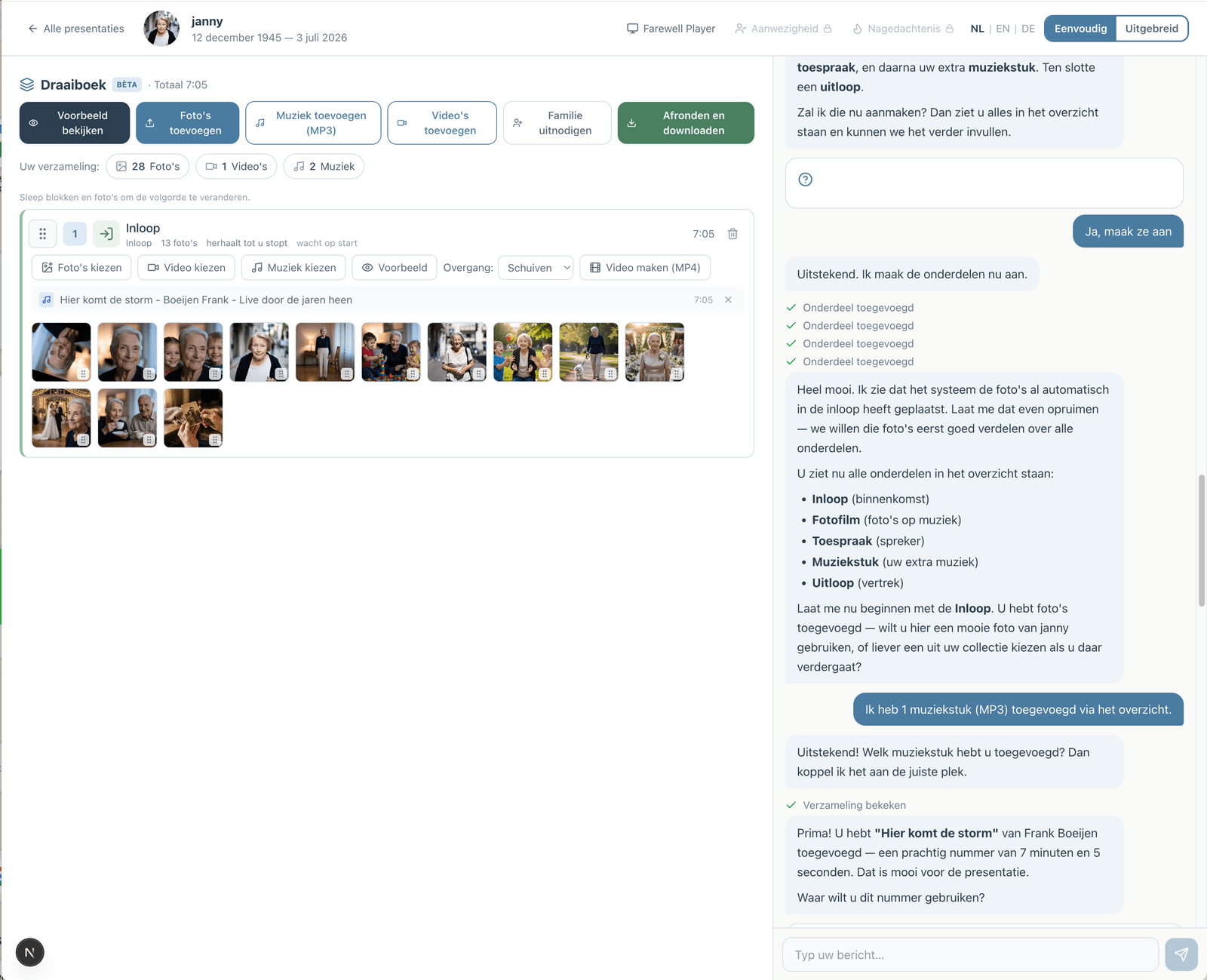
Prefer to go step by step? The assistant can help
If you would rather not figure everything out yourself, you can work with an assistant in the simple view. You describe how the service will go; the assistant prepares the parts, the music and the photos. You make the choices, and you can switch to the advanced view at any time.
How the assistant worksHow does it work?
Create a free account
Upload photos and videos
Choose music and customize
Download or share the presentation