

A free funeral slideshow maker, and exactly where free ends
Building and previewing costs nothing. Downloading the files without a watermark is paid, once per slideshow.
Start for freePay only when you download, with iDEAL | Wero or card
Upload together
Family add their own photos
Create together
You select the most meaningful photos
Watch together
View the presentation with family
The straight answer first
A free funeral slideshow maker usually turns out to be free up to a point, and ours is no different, so here is that point before you start. You can open an account, invite family, add photos, videos and music, lay out the whole service and play the preview with music as many times as you like. None of that costs anything and no payment details are asked for. You pay only if you want to download the files without a watermark to hand to the funeral home or venue. The rest of this page spells out which side of the line each feature sits on.
Easy to use
Create together with family
Professional result
Ready within an hour
How paying works
You pay once per slideshow, at the moment you download. There is no subscription and no payment details are taken up front. You can pay with iDEAL | Wero, Bancontact or card. The current price is on the pricing page and is shown again right before you pay. If you never pay, nothing is charged: you keep the watermarked preview and everything you built stays where it is, so you can still decide later.
There are two packages. The basic one gives you the slides as numbered photos (001.jpg, 002.jpg and so on), meant for venues that run their own playback system. The standard one adds the PowerPoint with the music inside it, the file for the free Farewell Player, and an MP4 memorial video for each part of the service. Ask the venue what they can play before you choose. If you start with the basic package you can still move up to the standard one afterwards.
If something changes after you have paid, say a cousin sends one more photo the night before or the closing song is swapped, you edit the slideshow and download it again. You are not charged a second time. The assistant in the simple view helps a limited number of times in the free version and without limit after payment. Anything the assistant does, you can also do yourself with the buttons.
Where free stops and paid begins
Free: everything to do with making it
Creating an account, inviting helpers, adding unlimited photos, videos and your own MP3 music, arranging the parts of the service, cropping slides and adding text. The running order for the day can be viewed and edited for free as well. There is no time limit and no cap on the number of photos.
Free, with a watermark: the preview
The preview plays the memorial slideshow the way it will run at the service, with the music and the pauses. Until you have paid, a light watermark sits over the picture. The operator sheet, a single page for whoever runs the screen, is always free.
Paid: the files without a watermark
Once you have paid, you download the slideshow without the watermark. The running order for the day and the order of service as PDFs are part of the paid slideshow too; before that you can read and edit them on screen. A link with a code that lets relatives watch the preview at home can also only be created after payment.
Completely free, slideshow or not
Two tools on the site cost nothing and are not tied to a slideshow: converting HEIC photos from an iPhone to JPEG, and pulling photos out of a PDF as separate JPEGs. Inside the slideshow itself you will not need them, because HEIC, JPEG, PNG, scans and PDFs all work as they are.
What you can do for free, in short
- Invite family and friends by email as helpers; they get in with their email address and a code and add photos, videos and music
- Add unlimited photos in HEIC, JPEG or PNG, plus scans and PDFs, with no converting first
- Add your own MP3s; the photos spread themselves across the length of the song
- Play the preview with music as often as you like, on a phone, tablet or laptop
- View and update the running order for the day, with times
Music in the free version
Adding your own MP3 files costs nothing, and they play in the free preview. A photo stays up for 8 seconds at most; with few photos and a long song, the sequence simply starts again.
In the extended view you can look up and listen to songs through Spotify and YouTube while you choose. That is free too.
Important: Spotify and YouTube are never part of the download, not even after payment. The files contain only the music you added yourself as MP3.
If it has to be free all the way
Then it helps to know what a free funeral slideshow maker like this one leaves you with if you never pay. You have a complete funeral photo slideshow that plays in the browser, with music, on a phone, tablet or laptop and with nothing to install. Connect the laptop to a television and the family can watch it together at home. The watermark stays visible.
What you do not have without paying is a watermark-free file the funeral home can play, or a PDF of the running order. For the service itself, or for a celebration of life in a hired room, the free version is therefore usually not enough. We would rather say so here than have 'free memorial slideshow' mean something different once you are nearly done.
So why build a free funeral slideshow maker this way? Because you get to see whether it works first: whether the photos sit well on the music, whether the order fits the service, whether the family recognises the person in it. You settle up only when it is finished and you want to use it.
Free to make and preview. One payment of … when you download.
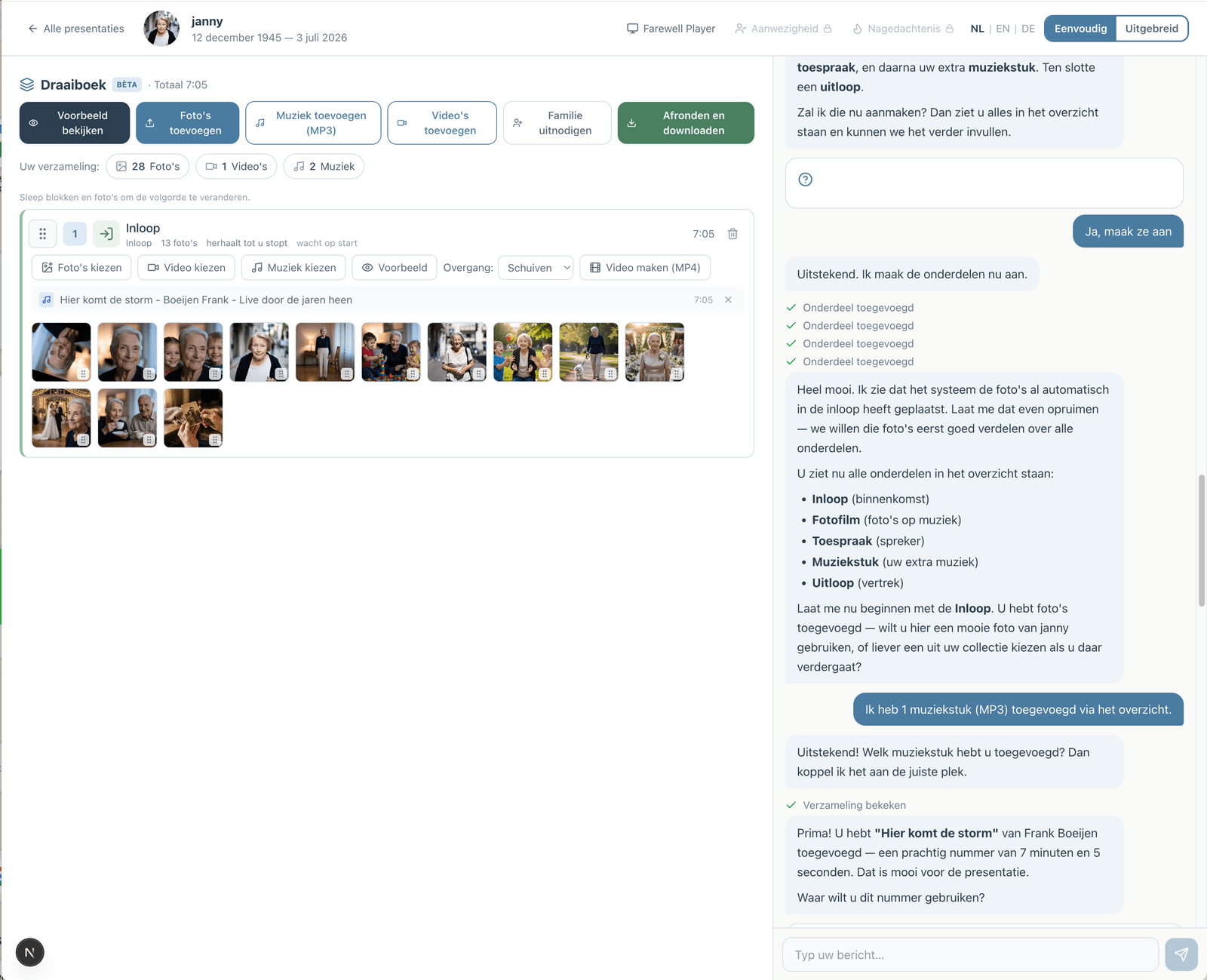
Prefer to go step by step? The assistant can help
If you would rather not figure everything out yourself, you can work with an assistant in the simple view. You describe how the service will go; the assistant prepares the parts, the music and the photos. You make the choices, and you can switch to the advanced view at any time.
How the assistant worksHow does it work?
Create a free account
Upload photos and videos
Choose music and customize
Download or share the presentation