
Help with your funeral presentation, step by step
You do not have to do it alone, and you do not need to be good with computers. You get help where you want it, and you stay in charge.
Start for freePay only when you download, with iDEAL | Wero or card
Upload together
Family add their own photos
Create together
You select the most meaningful photos
Watch together
View the presentation with family
Looking for help with a funeral presentation often means doing it alone
Making the presentation often falls to one person, within a few days, alongside everything else that needs arranging. Not everyone has experience with PowerPoint or knows how to make photos change with the music. Getting help with a funeral presentation does not have to mean handing the work to someone else. In The Last Farewell you get help in three ways: from an assistant that does the technical work, from family and friends who contribute photos, and from a set structure that follows how a funeral service runs.
Three kinds of help
An assistant that thinks along. In the simple view, an assistant asks you one question at a time: would you like to build the whole service or only a photo presentation? Who is speaking, which song plays during the entrance? As you answer, the assistant sets up the parts and spreads the photos over the music. You see it happen next to the conversation.
Family and friends who help. You invite them as helpers. With just their email address and a code, they add photos, videos and music from their own phone, tablet or laptop. Everything goes into one shared collection. No more chasing people or saving photos from group chats.
A structure that matches the service. Entrance, music, speaker, photo presentation, exit: the presentation follows the order of the service. The entrance repeats until you stop it, and during a speaker the presentation waits for a click. So you do not have to work out how it should run in the funeral hall.
What you get help with
- Setting up the running order of the service, part by part
- Collecting photos from family, even those who rarely use a computer
- Using iPhone photos (HEIC) and scans without converting anything
- The timing: how long each photo stays on screen with your music
- A first draft of a eulogy, based on what you tell
- A checklist for the day itself, to print
- The right file for the funeral home
Help, without taking it out of your hands
You decide which photos go in and in what order. The assistant does not judge who is in a photo or what year it was taken; it does explain how to move or remove photos in the overview.
Only text that you give or approve appears on the slides. If you do not like a suggestion, just say so, or change it yourself.
Prefer to do everything yourself? Switch to the advanced view with one click. Every option is at hand there, and your work is saved. You can always switch back.
Easy to use
Create together with family
Professional result
Ready within an hour
Letting someone else help
Sometimes the best help is a grandchild or nephew who is handy with computers. Give them full access as a helper: they can then work on the presentation itself while you watch along.
Family who live further away can watch via a viewing link with a PIN. That way everyone can say whether it feels right, without you having to send everything around.
Is a funeral director arranging the funeral? Ask whether they work with The Last Farewell. They can create the project for you and then let you continue at your own pace.
Help with the music
When you choose a song, the photos are spread over its length automatically. If there are too few for a long song, you will be told, so no photo stays on screen awkwardly long.
Unsure about a song? The assistant can let you hear a few ideas with a short clip. You add the song itself as your own MP3 file.
Important: In the advanced view you can also search and listen via Spotify and YouTube. The download always contains your own MP3; Spotify and YouTube are not included.
Help with delivering it
Ask the funeral home which format they use. You choose what fits when you download, and you can download another format later.
PowerPoint (.pptx)
For most funeral homes. Timing and transitions are already set.
Numbered photos
For a venue's own playback system: 001.jpg, 002.jpg, in the order of the service.
Farewell Player
Our own playback program, with photos, music and timing. Works without internet.
The help at a glance
- An assistant that asks one question at a time
- Family help with just an email address and a code
- Photos change with the music automatically
- All photo formats, including iPhone HEIC
- PowerPoint, numbered photos or the Farewell Player
- Always adjust it yourself in the advanced view
- Free to make, pay when you download
Why this kind of help?
Because it saves you time without making it less personal. You talk about the service and choose the photos; the calculations, the structure and the files are taken care of.
Everyone can take part. It works on phone, tablet and laptop, and nobody needs to install anything. iPhone photos (HEIC), JPEG and PNG work straight away.
You start for free and only pay when the presentation is ready and you download it. In the free version you can make a limited number of changes with the assistant.
Free to create and view. One-time … when exporting.
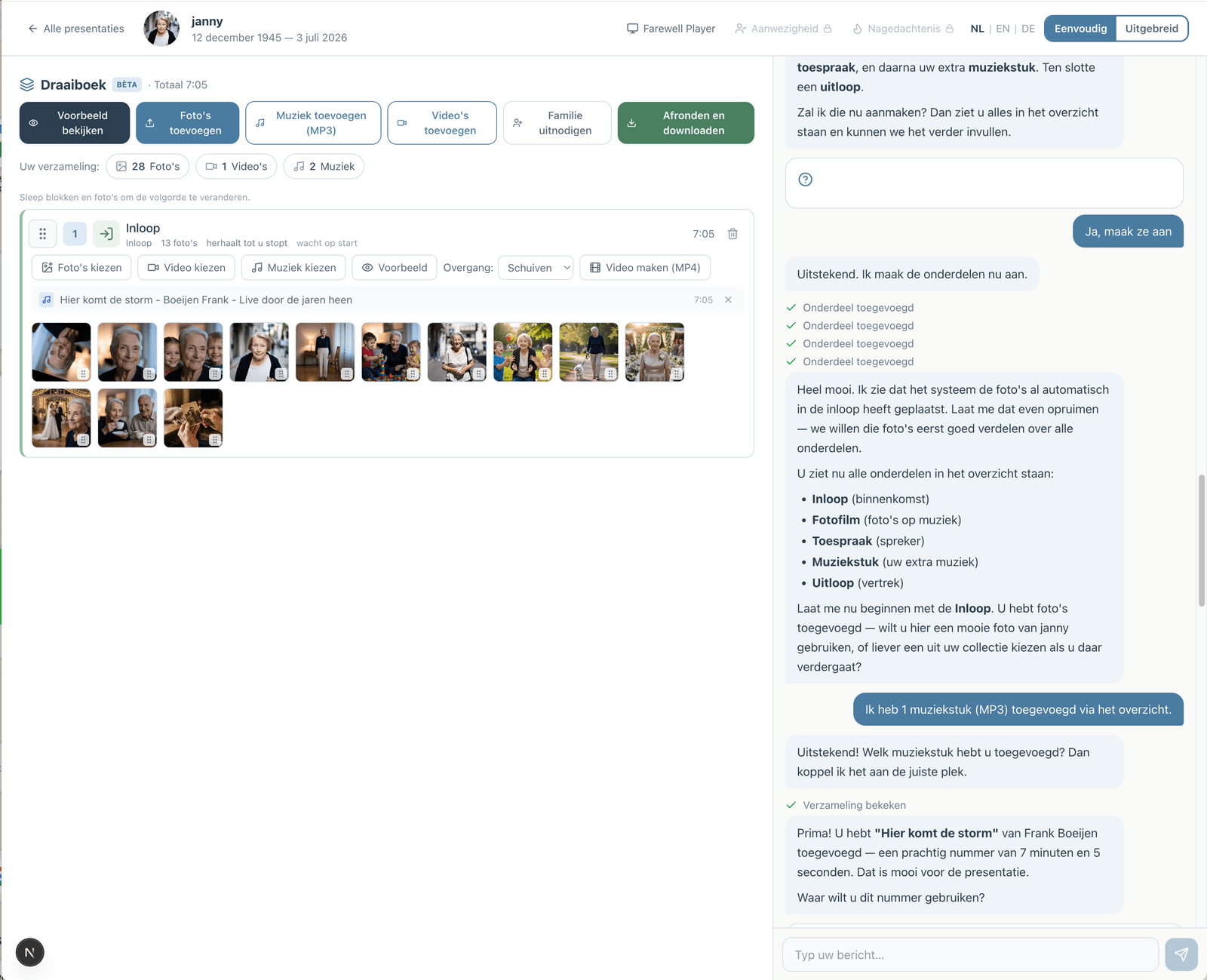
Prefer to go step by step? The assistant can help
If you would rather not figure everything out yourself, you can work with an assistant in the simple view. You describe how the service will go; the assistant prepares the parts, the music and the photos. You make the choices, and you can switch to the advanced view at any time.
How the assistant worksHow does it work?
Create a free account
Upload photos and videos
Choose music and customize
Download or share the presentation