
Can AI create a funeral presentation for me?
Partly, and that is a good thing. An AI assistant can take over much of the technical work: setting up the parts of the service, spreading photos over the music, working out the timing. But which photos matter, in what order and with which words: that is up to you. That is how it works in The Last Farewell: you tell, the assistant prepares, and you watch the presentation take shape next to the conversation.
What a general chatbot can and cannot do
A general chatbot can help you with ideas: which music suits a farewell, how to structure a eulogy, roughly how many photos you need. But it cannot make a presentation the funeral home can play:
- No workspace for your files. The photos from the whole family, the music and the order need to come together somewhere.
- No timing. A chatbot does not know how long your song is and cannot match photos to it.
- No file for the venue. It does not produce a PowerPoint, numbered photos or a playback program.
For that you need software that works with your own photos and music, and that knows how a funeral service is structured.
How The Last Farewell's assistant works
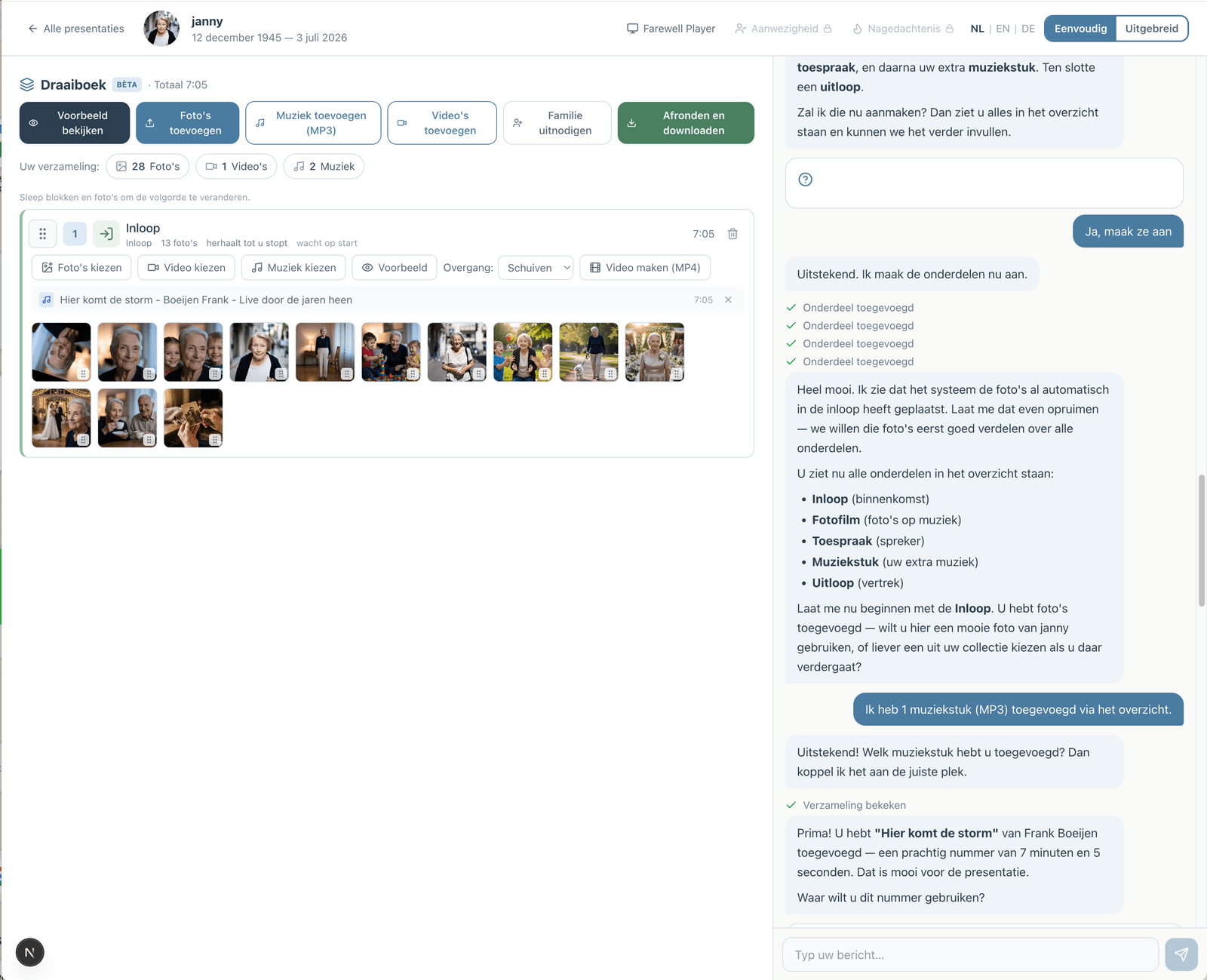
The Last Farewell has two views. In the advanced view you do everything yourself, with every option at hand. In the simple view you work together with an assistant. You can switch at any time; both work on the same presentation.
Step 1: What would you like to make?
The assistant asks whether you want to build the whole service (entrance, music, speakers, exit) or only a photo presentation set to music. You usually answer with a single click.
Step 2: Setting up the parts
Part by part, the assistant sets up the running order. Who is speaking? Which song plays during the entrance? Each part appears in the overview straight away.
Step 3: Photos, videos and music
Photos and videos come from the shared collection: what you upload yourself and what family and helpers add. The assistant spreads the photos across the parts and works out how long each photo stays on screen, exactly as in the advanced view. The entrance repeats until you stop it; during a speaker, the presentation waits for a click on each photo.
Step 4: Preview and finish
With "Preview" you see the presentation as it will be played. When you are happy, you download it as PowerPoint, numbered photos or for the Farewell Player.
What the assistant does
- Create, reorder or remove the parts of the service
- Spread photos from the collection, matched to the length of the music
- Tell you when there are too few photos for a long song
- Link your own MP3 to the right part
- Let you hear a few music ideas, with a short clip
- Place videos in a part
- Add an opening text with name and dates, or a short text on a chosen slide, in the words you give
- Write a first draft of a eulogy based on what you tell it, without making things up
- Make a checklist for the day itself
What the assistant deliberately does not do
- It does not look at or analyse your photos. Who is in a photo, how old someone is or what year it was taken: a program cannot know that reliably, and a wrong guess is painful at a farewell. You choose and order the photos; the assistant explains how to do that in the overview.
- It does not put text on slides that you have not given or approved.
- It does not decide for you. You can change or reject every suggestion.
Would you like your photos checked for blur or dark shots, or a suggestion for a portrait? Then the assistant first asks whether that is all right, and says what happens: an AI service looks at a reduced copy of your photos, only for sharpness, lighting and whether a photo suits as a portrait. Not who is in it. We keep no copy, only the outcome. If you say no, nobody looks at your photos. You then decide yourself what goes; the photos stay in the collection.
The assistant is a tool, not a replacement for your own choices. Want to do something yourself? Switch to the advanced view with one click.
Music
In the simple view you add music as your own MP3 file. Don't have the song yet? Enter its length now and link the file later. In the advanced view you can also search and listen via Spotify and YouTube. The download always contains your own MP3.
Privacy
Your photos are stored in The Last Farewell's secure environment. Only you and the people you invite as helpers have access. What you type in the conversation is processed by the AI service that powers the assistant. Photos are only viewed by that service if you give permission for the technical photo check.
Does the assistant cost extra?
No. Creating, viewing and editing is free. In the free version you can make a limited number of changes with the assistant; you pay once when you download the presentation.
Frequently asked questions
Do I have to use the assistant?
No. You can do everything yourself in the advanced view, and switch at any time.
Does the assistant work in English?
Yes. The assistant works in Dutch and English, depending on the language you use in The Last Farewell.
Can the assistant place videos?
Yes. You add videos to the collection; the assistant places them in the part you choose.
Can family still help?
Yes. As helpers, family and friends add photos, videos and music with just their email address and a code. Everything goes into the same collection the assistant works with.
What if I don't have music yet?
The assistant can still set up a running order. You add the music later, or enter its length if the funeral home plays the music.
Summary
An AI assistant can take over most of the technical work of a funeral presentation: setting up the parts, spreading photos, working out the timing. The choices that matter stay with you. Want to know more? Read how the assistant works or see how it works.
Zelf een presentatie maken?
Met The Last Farewell maakt u samen met familie een mooie afscheidspresentatie. Gratis te proberen, u betaalt alleen bij export.
Begin wanneer u er klaar voor bentCreate a presentation yourself?
Create a beautiful photo presentation together with family.
Start when you're ready