
Export PowerPoint as images for The Last Farewell
Do you have an existing PowerPoint presentation that you want to use in The Last Farewell? In this article, we explain step by step how to export your PowerPoint slides as images, so you can easily upload them.
Why export as images?
By exporting your PowerPoint as separate images (JPEG or PNG), you can:
- Upload the slides to The Last Farewell
- Add music and synchronize
- Adjust the order
- Add additional photos between slides
- Export to Farewell Player, PowerPoint or numbered JPEGs
Step 1: Open the presentation in PowerPoint
Open your existing PowerPoint presentation. This works in both PowerPoint for Mac and Windows.
Step 2: Go to Export
On Mac: Go to File → Export...
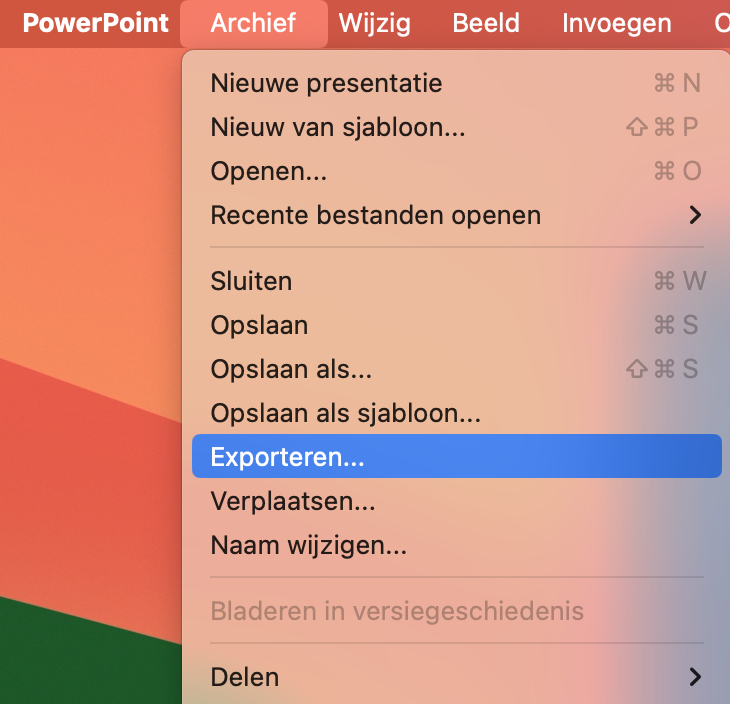
On Windows: Go to File → Save As or File → Export
Step 3: Choose the format
In the export window, select JPEG (recommended) or PNG under File Format.
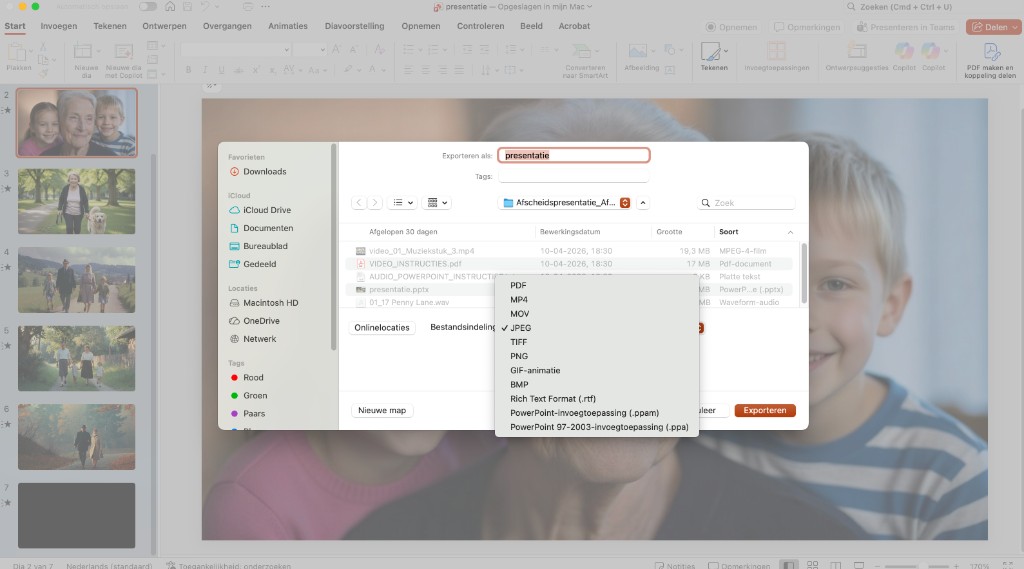
JPEG is best for photos and produces smaller files. Choose PNG only if your slides contain lots of text or sharp lines.
Step 4: Export all slides
Click Export. PowerPoint will now create a separate image from each slide and save them in a folder.

You will receive a confirmation that all slides have been saved. The images are numbered (Slide1.jpg, Slide2.jpg, etc.) and are in a new folder.
Step 5: Upload to The Last Farewell
Now you can upload the exported images to The Last Farewell:
- Go to your presentation in The Last Farewell
- Go to Photo Collection
- Click in the upload area or drag all exported images into it
- The photos are automatically processed and added to your collection
Tips
- Check the quality: Review the exported images before uploading. Sometimes special fonts or effects are lost.
- Keep the original: Keep your original PowerPoint file in case you want to make changes.
- Combine with photos: You can combine the PowerPoint slides with other photos in The Last Farewell.
Frequently asked questions
Can I keep animations and transitions?
No, when exporting as images, animations are lost. Each slide becomes one static image. If your presentation contains animations, only the end state of the slide is exported.
What resolution are the exported images?
PowerPoint exports at 1920x1080 pixels (Full HD) by default, which is sufficient for most screens.
Can I also extract videos from my PowerPoint?
Videos are not exported. If your presentation contains videos, you need to upload them separately to The Last Farewell.
Does this also work with Google Slides or Keynote?
Yes, both Google Slides and Apple Keynote have an export to images function:
- Google Slides: File → Download → JPEG image (.jpg)
- Keynote: File → Export to → Images
Create a presentation yourself?
Create a beautiful photo presentation together with family.
Start when you're ready